Bat: Modern Catppuccin-Powered File Viewer
Overview
Bat is a modern, feature-rich alternative to cat for the terminal. It provides beautiful syntax highlighting, Git integration, paging, and theming—making file viewing and code review a delight. With Winfig Dots, Bat is pre-configured with the Catppuccin Mocha theme, advanced filetype mapping, and seamless paging for a premium experience on Windows.
Features
- Catppuccin Mocha Theme: Beautiful, modern syntax highlighting for over 100 languages.
- Advanced Filetype Mapping: Custom mappings for Markdown, YAML, TOML, INI, JSON, scripts, configs, and more.
- Paging & Navigation: Always-on paging with mouse support and smooth navigation via
less. - Git Integration: Show Git changes in the gutter for quick code review.
- Line Numbers & Highlighting: Full support for line numbers, highlighting, and code style.
- Tabs & Indentation: Consistent 4-space tabs for all files.
- Fast & Lightweight: Instant output, even for large files.
Requirements
- Bat installed on Windows 11
- PowerShell 5+ for automation and scripting
- Git for Git gutter integration (optional)
- Administrator privileges for certain configurations
- Internet access for downloading dependencies
Quick Install
- Bat:
winget install --id sharkdp.bat -e - Git:
winget install --id Git.Git -e - PowerShell 7 (optional, recommended):
winget install --id Microsoft.Powershell -e
Installation Methods
One-line installation - Downloads and runs automatically:
```powershell title="Run in Administrative PowerShell"
Invoke-RestMethod -useb https://raw.githubusercontent.com/Get-Winfig/winfig-dots/refs/heads/main/Bat/setup.ps1 | Invoke-Expression
```
!!! success "Why Web Install?"
- Always gets the latest version
- No manual download required
- Automatic script verification

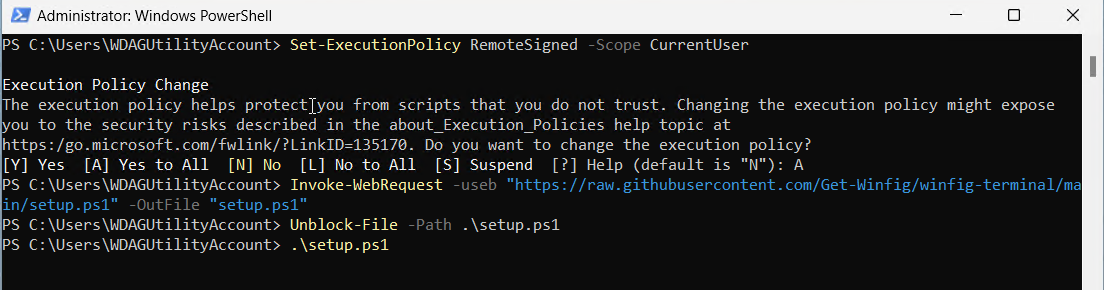
Download and run manually for offline environments:
Set-ExecutionPolicy RemoteSigned -Scope CurrentUser
# Download from GitHub
Invoke-WebRequest -useb "https://raw.githubusercontent.com/Get-Winfig/winfig-dots/refs/heads/main/Bat/setup.ps1" -OutFile "setup.ps1"
Unblock-File -Path .\setup.ps1
.\setup.ps1
Note
- Ensure you have the latest script version
- Manual updates required for new releases
- Verify script integrity before running
Configuration Highlights
- Catppuccin Mocha Theme: Bat uses the Catppuccin Mocha theme for a modern, visually appealing look.
- Full Style & Italics: Always use full style and italic text for code and prose.
- Tabs: 4-space tabs for consistent indentation.
- Paging:
Always-on paging with mouse support via
less. - Filetype Mapping: Extensive custom filetype mapping for accurate syntax highlighting (see below).
Usage
Basic Usage
- View a file with syntax highlighting:
bat myfile.py - Show line numbers and Git changes:
bat myfile.js - Page through large files with mouse support:
bat myfile.md - Use as a drop-in replacement for
cat:bat README.md
Example: Custom Filetype Mapping
Bat is configured to recognize and highlight a wide range of filetypes. For example:
bat --map-syntax "*.md:Markdown" --map-syntax "*.yml:YAML" --map-syntax "*.ps1:PowerShell" myfile.md
All mappings are pre-configured in your Winfig Dots bat config for maximum compatibility.
Configuration Highlights
- Catppuccin Theme:
All diffs, logs, and status outputs are styled with Catppuccin via Delta (
features = catppuccin-macchiato,syntax-theme = catppuccin-frappe). - Delta as Pager & Diff Tool: Delta is set as the default pager and diff tool for all relevant commands.
- VS Code Integration: Both the editor and merge tool are set to VS Code for a seamless experience.
- GPG Signing: Commits are signed by default for security and authenticity.
- Global Ignore & Includes:
Uses a global
.gitignoreand includes modular config snippets (e.g., Catppuccin settings). - Custom Log Format: Logs are decorated with color, author, date, GPG status, and more for clarity.
Frequently Asked Questions (FAQ)
How do I change the Bat theme?
Use the --theme flag or set it in your config file. Winfig Dots uses Catppuccin Mocha by default.
How do I enable paging and mouse support?
Paging is always on with the provided config. Mouse support is enabled via the less pager.
How do I add or change filetype mappings?
Edit your bat config and add more --map-syntax lines as needed.
How do I use Bat as a cat replacement?
Just use bat instead of cat in your terminal commands.
How do I update Bat?
Use your package manager (winget upgrade sharkdp.bat) or download the latest release from GitHub.
Where is my Bat config file?
Usually at %APPDATA%\bat\config on Windows or ~/.config/bat/config on Linux/macOS.
Troubleshooting
| Issue | Solution |
|---|---|
| Bat not found | Ensure it’s installed and in your PATH. Try restarting your terminal. |
| Theme/colors not applied | Check your config and terminal color support. |
| Filetype not highlighted | Add or adjust --map-syntax in your config. |
| Paging/mouse not working | Ensure less is installed and your terminal supports mouse events. |
| Git gutter not showing | Make sure Git is installed and the file is in a Git repo. |
If your issue isn’t listed, check the Bat documentation or Winfig GitHub Issues.